

I spent 20 years in the tech industry managing complex distributed systems. I could spot a memory leak in a server cluster from a mile away. But when it came to my own mind, I was running on “Legacy Code” that was crashing daily. I treated my anxiety like a character flaw. I treated my exhaustion like a weakness.
Then I realized: I wasn’t broken. I was just Thermal Throttling.
In System Reliability Engineering (SRE), when a CPU overheats, the system doesn’t just die. It intentionally slows down—throttles—to prevent the physical core from melting. The “slowness” isn’t a bug; it’s a safety protocol.
If you are feeling slow, foggy, or unmotivated, your internal Administrator is trying to save your hardware.
Here is the Root Cause Analysis (RCA). I used to debug my own burnout, using the only language that made sense to me: System Architecture.
1. The Diagnosis: You are stuck in “Sleep Mode” (S3 State)
Most of us think rest is just “lying down.” But in computing, there is a massive difference between Sleep Mode (S3) and a Hard Shutdown (S5).
- Sleep Mode: The screen is dark, but the RAM is still powered. The system is “idling,” waiting to jump back into work the second a key is pressed.
- Hard Shutdown: All processes are terminated. Zero power draw.
If you go to bed worrying about tomorrow’s stand-up or replaying an argument with your manager, you are in S3 Mode. Your “Mental RAM” is still powering those background tabs. This is why you wake up exhausted even after 8 hours of sleep—your battery was draining all night.
The Fix: The Digital Sunset You need a “Network Disconnect.” 120 minutes before sleep, cut the data stream. No Slack. No emails. Tell your brain: “The work-day data is now Read-Only. No further updates allowed until 08:00”.
2. The Protocol: The Social Firewall
We all have that one manager or coworker who drains our energy. I used to try to “fix” them or argue with them; it was a massive resource leak.
Then I realized: *I was granting them Write-Access to my self-worth. *
In a secure system, you don’t let every user write to the Root Directory. You set permissions.
The Fix: Read-Only Mode When a toxic person speaks, visualize setting their permissions to** Read-Only.**
- Read-Only: You can hear them (view the file).
- No Write Access: They cannot change your internal state.
- The Command: “Data Packet received. Viewing permissions only. Write Access denied”.
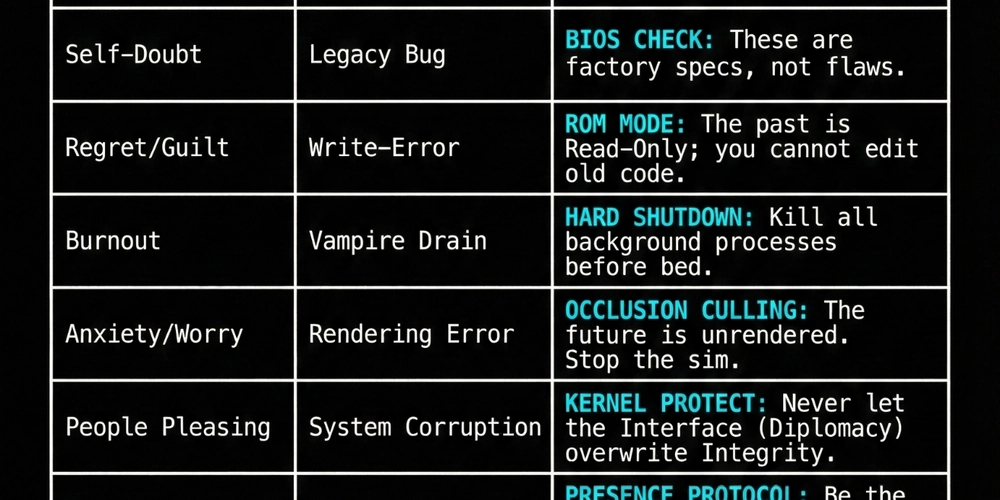
3. The Admin Cheat Sheet (SRE for the Soul)
I compiled a list of common “Human-OS” errors and the corresponding Admin Fixes
# ADMIN CHEAT SHEET | SYSTEM: HUMAN-OS
# ---------------------------------------------------------
# STATUS: CRITICAL
# ACTION: EXECUTING PRE-DEFINED FIXES...

[ERROR] High Stress detected
  > DIAGNOSIS: System Overheating
  > CMD FIX:   RUN "THROTTLE.EXE" (Step away from heat source immediately)

[ERROR] Toxic People detected
  > DIAGNOSIS: Unauthorized Access
  > CMD FIX:   SET PERMISSIONS = "READ-ONLY" (View data, but deny write access)

[ERROR] Overwhelmed
  > DIAGNOSIS: High CPU Load
  > CMD FIX:   INITIATE "MONITOR_LOGIC" (Observe chaos, do not sync to it)

[ERROR] Regret / Guilt Loop
  > DIAGNOSIS: Write-Error on Protected Drive
  > CMD FIX:   ENABLE "ROM_MODE" (The past is Read-Only; cannot edit old code)

[ERROR] Burnout
  > DIAGNOSIS: Vampire Power Drain
  > CMD FIX:   SUDO SHUTDOWN -H NOW (Kill all background processes before bed)

[ERROR] Anxiety / Worry
  > DIAGNOSIS: Rendering Error (Future not found)
  > CMD FIX:   ENABLE "OCCLUSION_CULLING" (Stop rendering un-generated levels)

[ERROR] No Purpose
  > DIAGNOSIS: Signal Loss
  > CMD FIX:   PING "PRESENCE_PROTOCOL" (Be the Stable Node. Maintain Steady Sig)
Conclusion: Claim Root Access
You have spent your life letting the world write to your self-worth. You’ve been living in a Guest Account, waiting for permission to be happy.
The turning point comes when you realize You are the Administrator. You choose which programs run. You choose who gets bandwidth. You choose when to shut down.
The Manual
I documented this full system upgrade in my book, “The Turning Point: The Story of a Broken Man and a Broken Laptop: How to Reboot Your System and Reclaim Root Access”.
It’s a short, practical guide written specifically for the engineering mind. It covers everything from Cache Clearance (getting rid of brain fog) to Handshake Protocols (fixing communication bugs).
The book is currently FREE / available on Kindle Unlimited.
Link to Download “The Turning Point” on Amazon – https://www.amazon.com/author/archietech