



Disclaimer: This is an experiment, not a benchmark, and not an architectural recommendation. Translation layers do not improve performance, whether you emulate MongoDB on PostgreSQL or PostgreSQL on MongoDB.
I wanted to test the performance of the mongo_fdw foreign data wrapper for PostgreSQL and rather than writing a specific benchmark, I used PgBench.
The default PgBench workload is not representative of a real application because all sessions update the same row — the global balance — but it’s useful for testing lock contention. This is where MongoDB shines, as it provides ACID guarantees without locking. I stressed the situation by running pgbench -c 50, with 50 client connections competing to update those rows.
To compare, I’ve run the same pgbench command on two PostgreSQL databases:
- PostgreSQL tables created with
pgbench -i, and benchmark run withpgbench -T 60 -c 50 - PostgreSQL foreign tables storing their rows into MongoDB collections, though the MongoDB Foreign Data Wrapper, and the same
pgbenchcommand with-nas there’s nothing to VACUUM on MongoDB.
Setup (Docker)
I was using my laptop (MacBook Pro Apple M4 Max), with local MongoDB atlas
I compiled mongo_fdw from EDB’s repository to add to the PostgreSQL 18 image with the following Dockerfile:
FROM docker.io/postgres:18 AS build
# Install build dependencies including system libmongoc/libbson so autogen.sh doesn't compile them itself
RUN apt-get update && apt-get install -y --no-install-recommends wget unzip ca-certificates make gcc cmake pkg-config postgresql-server-dev-18 libssl-dev libzstd-dev libmongoc-dev libbson-dev libjson-c-dev libsnappy1v5 libmongocrypt0 && rm -rf /var/lib/apt/lists/*
# Build environment
ENV PKG_CONFIG_PATH=/tmp/mongo_fdw/mongo-c-driver/src/libmongoc/src:/tmp/mongo_fdw/mongo-c-driver/src/libbson/src
ENV LD_LIBRARY_PATH=/usr/lib/x86_64-linux-gnu
ENV MONGOC_INSTALL_DIR=${LD_LIBRARY_PATH}
ENV JSONC_INSTALL_DIR=${LD_LIBRARY_PATH}
# get MongoDB Foreign Data Wrapper sources
RUN apt-get update && apt-get install -y --no-install-recommends wget unzip ca-certificates make gcc cmake pkg-config postgresql-server-dev-18 libssl-dev libzstd-dev libmongoc-dev libjson-c-dev libsnappy1v5 libmongocrypt0
ADD https://github.com/EnterpriseDB/mongo_fdw/archive/refs/heads/master.zip /tmp/sources.zip
RUN mkdir -p /tmp/mongo_fdw && unzip /tmp/sources.zip -d /tmp/mongo_fdw
# Build MongoDB Foreign Data Wrapper
WORKDIR /tmp/mongo_fdw/mongo_fdw-master
# remove useless ping
RUN sed -i -e '/Ping the database using/d' -e 's?if (entry->conn != NULL)?/*&?' -e 's?return entry->conn?*/&?' connection.c
# build with Mongodb client
RUN ./autogen.sh && make USE_PGXS=1 && make USE_PGXS=1 install
# final stage
FROM docker.io/postgres:18
COPY --from=build /usr/share/postgresql/18/extension/mongo_fdw* /usr/share/postgresql/18/extension/
COPY --from=build /usr/lib/postgresql/18/lib/mongo_fdw.so /usr/lib/postgresql/18/lib/
RUN apt-get update && apt-get install -y libmongoc-1.0-0 libbson-1.0-0 libmongocrypt0 libsnappy1v5 libutf8proc-dev && rm -rf /var/lib/apt/lists/*
I built this image (docker build -t pachot/postgres_mongo_fdw) and started it, linking it to a MongoDB Atlas container:
# start MongoDB Atlas (use Atlas CLI)
atlas deployments setup  mongo --type local --port 27017 --force

# start PostgreSQL with Mongo FDW linked to MongoDB
docker run -d --link mongo:mongo --name mpg -p 5432:5432 \
 -e POSTGRES_PASSWORD=x pachot/postgres_mongo_fdw
I created a separate database for each test:
export PGHOST=localhost
export PGPASSWORD=x
export PGUSER=postgres

psql -c 'create database pgbench_mongo_fdw'
psql -c 'create database pgbench_postgres'
For the PostgreSQL baseline, I initialized the database with pgbench -i pgbench_postgres, which creates the tables with primary keys and inserts 100,000 accounts into a single branch.
For MongoDB, I defined the collections as foreign tables and connected with psql pgbench_mongo_fdw:
DROP EXTENSION if exists mongo_fdw CASCADE;

-- Enable the FDW extension
CREATE EXTENSION mongo_fdw;

-- Create FDW server pointing to the MongoDB host
CREATE SERVER mongo_srv
    FOREIGN DATA WRAPPER mongo_fdw
    OPTIONS (address 'mongo', port '27017');

-- Create user mapping for the current Postgres user
CREATE USER MAPPING FOR postgres
    SERVER mongo_srv
    OPTIONS (username 'postgres', password 'x');

-- Foreign tables for pgbench schema
CREATE FOREIGN TABLE pgbench_accounts(
    _id name,
    aid int, bid int, abalance int, filler text
)
SERVER mongo_srv OPTIONS (collection 'pgbench_accounts');

CREATE FOREIGN TABLE pgbench_branches(
    _id name,
    bid int, bbalance int, filler text
)
SERVER mongo_srv OPTIONS (collection 'pgbench_branches');

CREATE FOREIGN TABLE pgbench_tellers(
    _id name,
    tid int, bid int, tbalance int, filler text
)
SERVER mongo_srv OPTIONS (collection 'pgbench_tellers');

CREATE FOREIGN TABLE pgbench_history(
    _id name,
    tid int, bid int, aid int, delta int, mtime timestamp, filler text
)
SERVER mongo_srv OPTIONS (collection 'pgbench_history');
On the MongoDB server, I created the user and the collections mapped from PostgreSQL (using mongosh):
db.createUser( {
  user: "postgres",
  pwd: "x",
  roles: [ { role: "readWrite", db: "test" } ]
} )
;

db.dropDatabase("test");
use test;

db.pgbench_branches.createIndex({bid:1},{unique:true});
db.pgbench_tellers.createIndex({tid:1},{unique:true});
db.pgbench_accounts.createIndex({aid:1},{unique:true});
db.createCollection("pgbench_history");
Because pgbench -i truncates tables, which the MongoDB Foreign Data Wrapper does not support, I instead use INSERT commands (via psql pgbench_mongo_fdw) similar to those run by pgbench -i:
\set scale 1

INSERT INTO pgbench_branches (bid, bbalance, filler)
  SELECT bid, 0, ''
  FROM generate_series(1, :scale) AS bid;

INSERT INTO pgbench_tellers (tid, bid, tbalance, filler)
  SELECT tid, ((tid - 1) / 10) + 1, 0, ''
  FROM generate_series(1, :scale * 10) AS tid;

INSERT INTO pgbench_accounts (aid, bid, abalance, filler)
  SELECT aid, ((aid - 1) / 100000) + 1, 0, ''
  FROM generate_series(1, :scale * 100000) AS aid;
Here is what I’ve run—the results follow:
docker exec -it mpg \
 pgbench    -T 60 -P 5 -c 50 -r -U postgres -M prepared pgbench_postgres

docker exec -it mpg \
 pgbench -n -T 60 -P 5 -c 50 -r -U postgres -M prepared pgbench_mongo_fdw
PostgreSQL (tps = 4085, latency average = 12 ms)
Here are the results of the standard pgbench benchmark on PostgreSQL tables:
franck.pachot % docker exec -it mpg \
 pgbench    -T 60 -P 5 -c 50 -r -U postgres -M prepared pgbench_postgres

pgbench (18.1 (Debian 18.1-1.pgdg13+2))
starting vacuum...end.
progress: 5.0 s, 3847.4 tps, lat 12.860 ms stddev 14.474, 0 failed
progress: 10.0 s, 4149.0 tps, lat 12.051 ms stddev 12.893, 0 failed
progress: 15.0 s, 3940.6 tps, lat 12.668 ms stddev 12.576, 0 failed
progress: 20.0 s, 3500.0 tps, lat 14.300 ms stddev 16.424, 0 failed
progress: 25.0 s, 4013.0 tps, lat 12.462 ms stddev 13.175, 0 failed
progress: 30.0 s, 3437.4 tps, lat 14.539 ms stddev 25.607, 0 failed
progress: 35.0 s, 4421.9 tps, lat 11.308 ms stddev 12.100, 0 failed
progress: 40.0 s, 4485.0 tps, lat 11.140 ms stddev 12.031, 0 failed
progress: 45.0 s, 4286.2 tps, lat 11.654 ms stddev 13.244, 0 failed
progress: 50.0 s, 4008.6 tps, lat 12.476 ms stddev 13.586, 0 failed
progress: 55.0 s, 4551.8 tps, lat 10.959 ms stddev 13.791, 0 failed
progress: 60.0 s, 4356.2 tps, lat 11.505 ms stddev 15.813, 0 failed
transaction type: <builtin: TPC-B (sort of)>
scaling factor: 1
query mode: prepared
number of clients: 50
number of threads: 1
maximum number of tries: 1
duration: 60 s
number of transactions actually processed: 245035
number of failed transactions: 0 (0.000%)
latency average = 12.234 ms
latency stddev = 14.855 ms
initial connection time = 38.862 ms
tps = 4085.473436 (without initial connection time)
statement latencies in milliseconds and failures:
         0.000           0 \set aid random(1, 100000 * :scale)
         0.000           0 \set bid random(1, 1 * :scale)
         0.000           0 \set tid random(1, 10 * :scale)
         0.000           0 \set delta random(-5000, 5000)
         0.036           0 BEGIN;
         0.058           0 UPDATE pgbench_accounts SET abalance = abalance + :delta WHERE aid = :aid;
         0.039           0 SELECT abalance FROM pgbench_accounts WHERE aid = :aid;
        10.040           0 UPDATE pgbench_tellers SET tbalance = tbalance + :delta WHERE tid = :tid;
         1.817           0 UPDATE pgbench_branches SET bbalance = bbalance + :delta WHERE bid = :bid;
         0.041           0 INSERT INTO pgbench_history (tid, bid, aid, delta, mtime) VALUES (:tid, :bid, :aid, :delta, CURRENT_TIMESTAMP);
         0.202           0 END;
The run averages 4,000 transactions per second with 12 ms latency. Most latency comes from the first update, when all connections target the same row and cannot execute concurrently.
MongoDB (tps = 4922, latency average = 10 ms)
Here is the same run, with foreign tables reading from and writing to MongoDB instead of PostgreSQL:
franck.pachot % docker exec -it mpg \
 pgbench -n -T 60 -P 5 -c 50 -r -U postgres -M prepared pgbench_mongo_fdw

pgbench (18.1 (Debian 18.1-1.pgdg13+2))
progress: 5.0 s, 4752.1 tps, lat 10.379 ms stddev 4.488, 0 failed
progress: 10.0 s, 4942.9 tps, lat 10.085 ms stddev 3.356, 0 failed
progress: 15.0 s, 4841.7 tps, lat 10.292 ms stddev 2.256, 0 failed
progress: 20.0 s, 4640.4 tps, lat 10.744 ms stddev 3.498, 0 failed
progress: 25.0 s, 5011.3 tps, lat 9.943 ms stddev 1.724, 0 failed
progress: 30.0 s, 4536.0 tps, lat 10.996 ms stddev 8.739, 0 failed
progress: 35.0 s, 4862.1 tps, lat 10.248 ms stddev 2.062, 0 failed
progress: 40.0 s, 5080.6 tps, lat 9.812 ms stddev 1.740, 0 failed
progress: 45.0 s, 5238.3 tps, lat 9.513 ms stddev 1.673, 0 failed
progress: 50.0 s, 4957.9 tps, lat 10.055 ms stddev 2.136, 0 failed
progress: 55.0 s, 5184.8 tps, lat 9.608 ms stddev 1.550, 0 failed
progress: 60.0 s, 4998.5 tps, lat 9.970 ms stddev 2.296, 0 failed
transaction type: <builtin: TPC-B (sort of)>
scaling factor: 1
query mode: prepared
number of clients: 50
number of threads: 1
maximum number of tries: 1
duration: 60 s
number of transactions actually processed: 295288
number of failed transactions: 0 (0.000%)
latency average = 10.122 ms
latency stddev = 3.487 ms
initial connection time = 45.401 ms
tps = 4921.889293 (without initial connection time)
statement latencies in milliseconds and failures:
         0.000           0 \set aid random(1, 100000 * :scale)
         0.000           0 \set bid random(1, 1 * :scale)
         0.000           0 \set tid random(1, 10 * :scale)
         0.000           0 \set delta random(-5000, 5000)
         0.121           0 BEGIN;
         2.341           0 UPDATE pgbench_accounts SET abalance = abalance + :delta WHERE aid = :aid;
         0.339           0 SELECT abalance FROM pgbench_accounts WHERE aid = :aid;
         2.328           0 UPDATE pgbench_tellers SET tbalance = tbalance + :delta WHERE tid = :tid;
         2.580           0 UPDATE pgbench_branches SET bbalance = bbalance + :delta WHERE bid = :bid;
         2.287           0 INSERT INTO pgbench_history (tid, bid, aid, delta, mtime) VALUES (:tid, :bid, :aid, :delta, CURRENT_TIMESTAMP);
         0.126           0 END;
MongoDB doesn’t wait for locks, so all statements have similar response times. This yields higher throughput and lower latency, with the additional layer’s overhead offset by the faster storage engine.
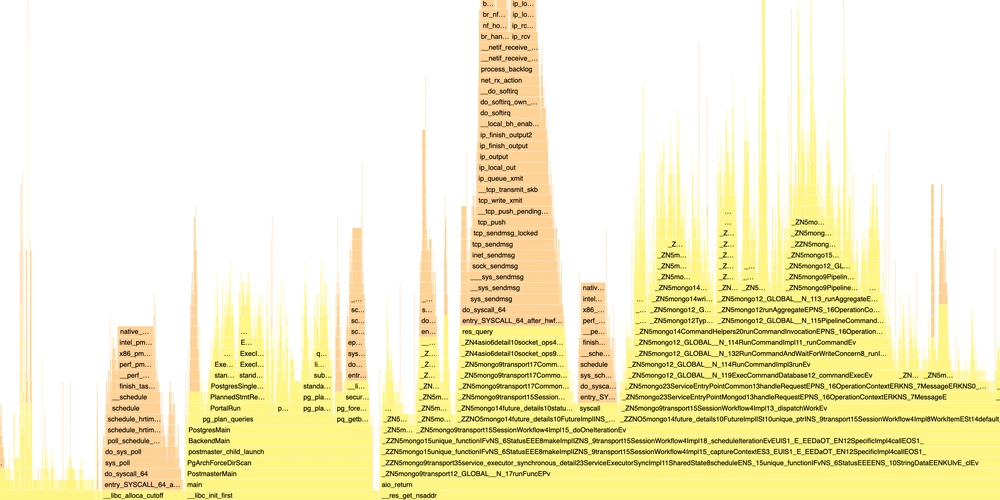
In the Dockerfile, I patched the foreign data wrapper’s connection.c when I’ve seen unnecessary ping in the call stack. Running on MongoDB collections was still faster than PostgreSQL with the original code. The PostgreSQL foreign data wrapper, while useful, is rarely optimized, adds latency, and offers limited transaction control and pushdown optimizations. It can still be acceptable to offload some tables to MongoDB collections until you convert your SQL and connect directly to MongoDB.